
Q: What system is used for staff timekeeping?
A: Headfirst uses WhenIWork for both schedules and timeclock (aka timesheets and time tracking). Before your first day, we will add you to the system where you’ll create a login and find your When I Work employee ID in your profile.
–> Download WhenIWork for Android
–> Download WhenIWork for iOS
Q: What do I need to clock in or clock out?
A: You will need your When I Work employee ID to clock in/out.
- To find it: Go to the WhenIWork app > Profile > Employee ID (a 4- or 5-digit ID number).
- Please memorize these numbers so that the clock in/out process can be smoothly facilitated.
Q: What if I don’t clock in or out?
A: If you forget to clock-in or clock-out, please notify your Director immediately.
Not clocking in or forgetting to clock out impacts our ability to pay you, as no time is tracked for that day.
- Your clocked-in hours tell the Payroll Department how to calculate your earnings for that pay period.
Q: When should I clock in?
A: Please refer to your schedule for the time you are expected to begin work. You should clock in at the start time listed in your WhenIWork schedule.
- Please do not begin work any earlier as you will not be compensated for work beginning prior to your start time without prior approval. If you have any questions about your start time, please ask your Director.
Q: My question wasn’t answered here.
A: If you have any additional questions, submit them to the Talent Helpline Form.
During the summer, payroll is processed biweekly (i.e., every other week) for each unit.
Summer 2026 Schedule
| Work Period (Monday – Sunday) | Pay Date (Friday) | |
|---|---|---|
| May 25 – June 7 | June 12 | |
| June 8 – June 21 | June 26 | |
| June 22 – July 5 | July 10 | |
| July 6 – July 19 | July 24 | |
| July 20 – August 2 | August 7 | |
| August 3 – August 16 | August 21 | |
| August 17 – August 30 | September 4 | |
| _______ |
Please note there is a one-week delay between the compensation earned for the current week’s work and the pay received.
In other words, each paycheck will not include the current week’s work; instead your compensation includes the pay earned during the two weeks immediately before the current week.
- For example, the payroll running on Friday, July 10 will be for work done during the weeks of June 22 and June 29.
Please see the other FAQs for more insight on the methods and schedule.
During the summer, payroll is processed biweekly (i.e., every other week) for each unit.
Summer 2026 Schedule
| Work Period (Monday – Sunday) | Pay Date (Friday) | |
|---|---|---|
| May 18 – May 31 | June 5 | |
| June 1 – June 14 | June 18 (Thursday) | |
| June 15 – June 28 | July 3 | |
| June 29 – July 12 | July 17 | |
| July 13 – July 26 | July 31 | |
| July 27 – August 9 | August 14 | |
| August 10 – August 23 | August 28 | |
| _______ |
Please note there is a one-week delay between the compensation earned for the current week’s work and the pay received.
In other words, each paycheck will not include the current week’s work; instead your compensation includes the pay earned during the two weeks immediately before the current week.
- For example, the payroll running on Friday, July 3 will be for work done during the weeks of June 15 and June 22.
Please see the FAQs for more insight on the methods and schedule.
Payroll Schedule Video Timestamps:
0:08 Pay period duration
0:22 Pay day
0:44 Example #1 – Worked during current pay period
1:06 Example #2 – Worked after current pay period
1:34 Preparation timeline Monday – Friday
2:52 Contact us
If you have any additional questions, submit them here at the Talent Helpline Form.
Throughout the interviewing and hiring process, we ask for open communication regarding your interest and weekly availability.
Should your availability change substantially from the dates listed in your offer letter, it may impact scheduling in the weeks surrounding the change.
While not a guarantee, the sooner you are able to inform the Talent Department of the change, the more likely it will be that staffing adjustments can be made which minimize this impact.
If at any point the dates you can work change, we ask that you submit a Schedule Update Request Form, found here.
Once you’ve signed your offer letter, you’ll be sent to Onboarding – our online system that includes all mandatory pre-employment paperwork specific to you and your summer work location. This is the first step towards a successful summer!
Q: Why do I have to complete this paperwork?
A: So you can come work at camp! You won’t be able to start working until all of your Onboarding paperwork is finished, so please complete the forms and tasks assigned to you carefully!
Q: I didn’t get an email with the login information. Help!
A: If it’s not yet May 1, don’t worry! We haven’t launched it yet.
If it’s after May 1, we launch team members in rolling waves. Please be sure to check your email’s Clutter/Junk filter settings and add the address Headfirst Camps @ icims “headfirstcamps+autoreply@agents.icims.com” to your Address Book if you suspect that emails may otherwise be flagged as spam. You will receive an email with your login username and an option to reset the password if needed. Please store these details in a safe place.
Q: My question isn’t answered here. Who can I contact?
You can reach out to the person you’ve been in contact directly, or submit your question to the Talent Helpline here. A staff member will be in touch ASAP!
To support all seasonal staff – Honor Roll, Summer Camps, and Professional Sports Camps – in completing their onboarding tasks and paperwork, we have scheduled Onboarding Help Sessions, or “Office Hours,” throughout the spring.
These are drop-in, as-needed sessions, so feel free to join for any questions if you have them!
Microsoft Teams links will be sent out in advance of each session.
2026 Session Dates & Times
- Thursday, April 23 – 6-7 pm EST
- Wednesday, May 13 – 7-8 pm EST
- Tuesday, June 2 – 6 – 7 pm EST
Updated 4/15/2026
Q: What forms and information will I have to fill out?
A: Please see the list below for a summary of the details required. Almost all are provided digitally within the Onboarding portal. (Fingerprinting and notary must be done on paper and uploaded, as well as some required health documentation.)
FORMS ABOUT YOU
- Basic contact information, references, and certifications (if applicable)
- This lets us contact you, check references, and review any certifications required for your position (ie lifeguarding or CPR/First Aid).
- Headfirst Health Information Request
- This form gives us information in the event a health issue occurs for you – who to contact, allergies, medications, etc. It’s confidential unless needed in an emergency.
- Seasonal Team Confidentiality Agreement
- This form requires a signature noting your understanding that Headfirst content, information, resources, and trainings, etc. be kept confidential.
- Federal I9 Form
- This verifies your identity and authorizes you to work.
- Background Check Self-Disclosure Form
- This gives you an opportunity to self-disclose anything that may pop up in a background check.
PAYROLL
- Direct Deposit/Paycheck Information
- This form gives us the information on how to pay you! Make sure it’s correct!
- Tax Withholding Forms (state specific)
- This forms allows you to select which STATE taxes are taken out of your paycheck.
- Federal W4 Form
- This form allows you to select which FEDERAL taxes are taken out of your paycheck.
BACKGROUND CHECKS
There may be additional state-specific requirements based on licensing guidelines. Please see the Onboarding task instructions for more details.
- Child Protective Services Checks (state specific instructions)
- As a child programs provider, we are required to run a check through the child protective agency of the jurisdiction to confirm our staff are approved to work with children.
- Background/Fingerprint Checks (state specific instructions)
- This form provides information on how to get a background check and/or fingerprinting check done and depends on the state guidelines. It requires a visit to an authorized provider as per the instructions.
HEALTH DOCUMENTATION
- MASSACHUSETTS: Physical & Vaccination History
- Massachusetts requires a recent physical and complete vaccination history to be reviewed and approved prior to working at camp.
- VIRGINIA: TB Screening Request
- Virginia requires a clear tuberculosis check prior to working at camp. This can be done in two parts at a doctor’s office or CVS. It requires an initial visit and then a follow-up to read the results in person.
All newly hired or rehired team members are required to complete a background check authorization and a self-disclosure form as a part of pre-employment onboarding. All offers of employment are contingent upon the satisfactory outcome of this background investigation, and team members must successfully complete these requirements before starting work.
Please note: Depending on your work location’s jurisdiction, there may be additional tasks related to background checking, like submitting fingerprints.
Background Check Authorization
- An important component of your pre-employment onboarding is the completion of a background check authorization. To ensure the accuracy and security of our checks, we partner with a trusted pre-employment screening service provider.
- The background check authorization will be emailed to you at the same time you receive the email on accessing the onboarding portal (where the other paperwork lives).
- Your completed and authorized background check must be processed and cleared by our HR team before you are approved to go to site. Processing time varies by jurisdiction and additional time can be needed if a result is returned that requires further investigation or individual evaluation, so it is very important to authorize the check as quickly as possible.
Self-Disclosure Form
- In addition to your background check authorization, you will be required to complete a Self-Disclosure Form as part of your onboarding tasks. As with the background check authorization, it is important that you complete the Self-Disclosure form promptly, as any affirmative responses (or discrepancies between the background check results and your responses) can require further investigation or individual evaluation.
Confidentiality & Use of Background Investigation Information
- The information obtained through the background check and self-disclosure process will be treated confidentially and used only for purposes of determining suitability to work in the role for which you have been hired in accordance with Headfirst’s Background Investigation & Fitness to Work policy. This policy is available by contacting the Human Resources Department.
- If the background investigation results or the answers provided on the Self-Disclosure Form require further discussion, a designated HR representative will contact you directly as soon as possible
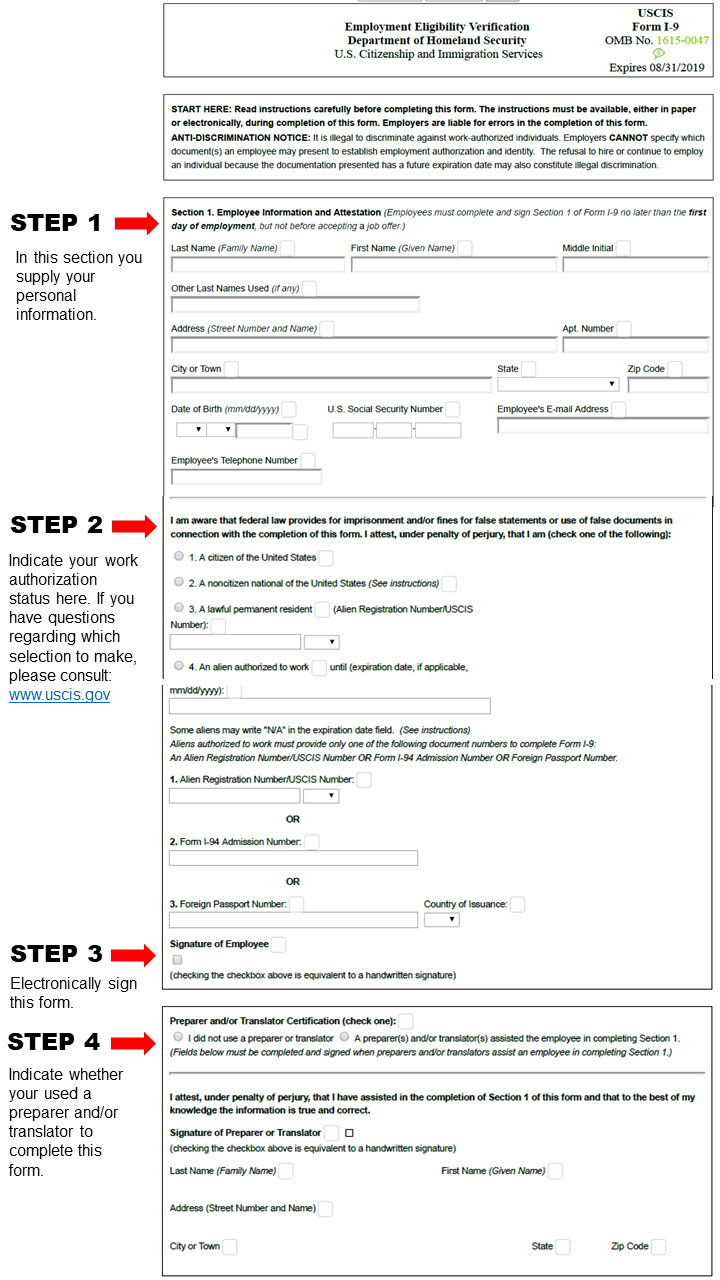
Q: What is the Federal I-9 Form?
A: Federal law requires employers to verify that new employees as well as reverify that returning employees are legally authorized to work in the United States. By completing the I-9 form, you provide Headfirst with the necessary information to confirm your employment eligibility.
The form is two parts – the information you complete, and then the identity document verification — this is where Headfirst staff will view your documents to prove your identity, therefore confirming the information.
Q: What are “I9 Identity Items” and when do I need to bring them?
A: The I9 identity items (or “acceptable documents” are the physical ID items that provide identification as well as confirm your eligibility to work in the United States.
You will need to bring the original identity items for our team to verify at in-person training, or your first day of employment onsite. Please do not upload or send a photo of them via email.
Valid identification items include:
- US Passport or Passport Card (original) OR
- Driver license with photo AND Social Security card (original) OR
- Driver license with photo AND birth certificate (original) OR
- For additional guidance and the full list of accepted documents, go here.
(You do NOT need to print a copy of the I9 form – “documents” refers to the physical identity items that show your identity.)
Q: What sections do I need to complete?
A: Please see below for a more detailed overview of the steps necessary to complete the form.
I-9 Form Instructions